排序

OpenCASCADE Performance Test
OpenCASCADE Performance Test eryar@163.com Abstract. Use the Draw Test Harness to test the performance of OpenCASCADE by Tcl scripts. From the test result, you will check whether t...
 eryar

Construction of Primitives in Open Cascade
Construction of Primitives in Open Cascade eryar@163.com 一、创建基本图元 Making Primitives 将用到如下的类创建基本图元,包括长方体(Box)、楔形体(Wedge)、旋转体(Revol)等。这些类提供S...
eryar
OpenCASCADE Chamfer 2D
OpenCASCADE Chamfer 2D eryar@163.com 二维的倒角Chamfer功能可以将两个不平行的曲线进行倒角。如下图所示为QCAD中进行倒角的效果图:选择要倒角的两个边,及设置两个边上的倒角...
eryar
使用Gmail邮箱
由于国内不能直接访问google,所以其相关产品也不能直接使用。因为Gmail简洁,使用方便,国际上用的人很多。最近发现网易邮箱大师可以直接访问Gmail,所以将方法介绍给大家,如果大家只有访问Gm...
eryar
OpenCASCADE构造一般曲面
OpenCASCADE构造一般曲面 eryar@163.com Abstract. 本文主要介绍常见的曲面如一般柱面(拉伸曲面)、旋转面在OpenCASCADE中的构造方法,由此思考一般放样算法的实现。 Key Words. Common Surfac...
eryar
Representation Data in OpenCascade BRep
Representation Data in OpenCascade BRep eryar@163.com 摘要Abstract:现在的显示器大多数是光栅显示器,即可以看做一个像素的矩阵。在光栅显示器上显示的任何图形,实际上都是一些具有一种或...
eryar
OpenCASCADE 曲线向曲面投影
OpenCASCADE 曲线向曲面投影 eryar@163.com Abstract: Project a curve on a surface no matter the surface is a plane or BSpline Surface. The projected result curve are all BSpli...
eryar
OpenCascade Tcl vs. ACIS Scheme
OpenCascade Tcl vs. ACIS Scheme eryar@163.com 摘要Abstract:本文通过OpenCascade的Tcl/Tk和ACIS的Scheme的对比来说明脚本语言在程序中的重要作用。及通过在Tcl中实现自定义的命令来理解Draw...
eryar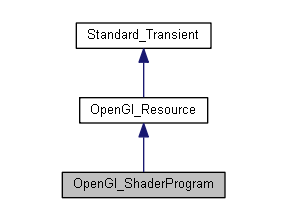
OpenGL Shader in OpenCASCADE
OpenGL Shader in OpenCASCADE eryar@163.com Abstract. As implementation of one of the strategic steps in OpenCASCADE visualization component development road-map, support for GLSL s...
eryar
OpenCASCADE 平面与球面求交
OpenCASCADE 平面与球面求交 eryar@163.com OpenCASCADE提供了类IntAna_QuadQuadGeo用来计算两个二次曲面quadric(球面、圆柱面、圆锥面及平面,平面是二次曲面的特例)之间的交线...
eryar
OpenCASCADE DataExchange DWG
OpenCASCADE DataExchange DWG eryar@163.com Abstract. DWG is a file format created in the 70’s for the emerging CAD applications. Currently it is the native file format of AutoCAD,...
eryar
Installing Node.js and Express on Ubuntu
Installing Node.js and Express on Ubuntu 1. 在nodejs官网上下载Linux Binaries(已经包含了npm):2. 安装Node.js下载后解压,并在解压的文件夹中启动Terminal后,输入命令: ...
eryar